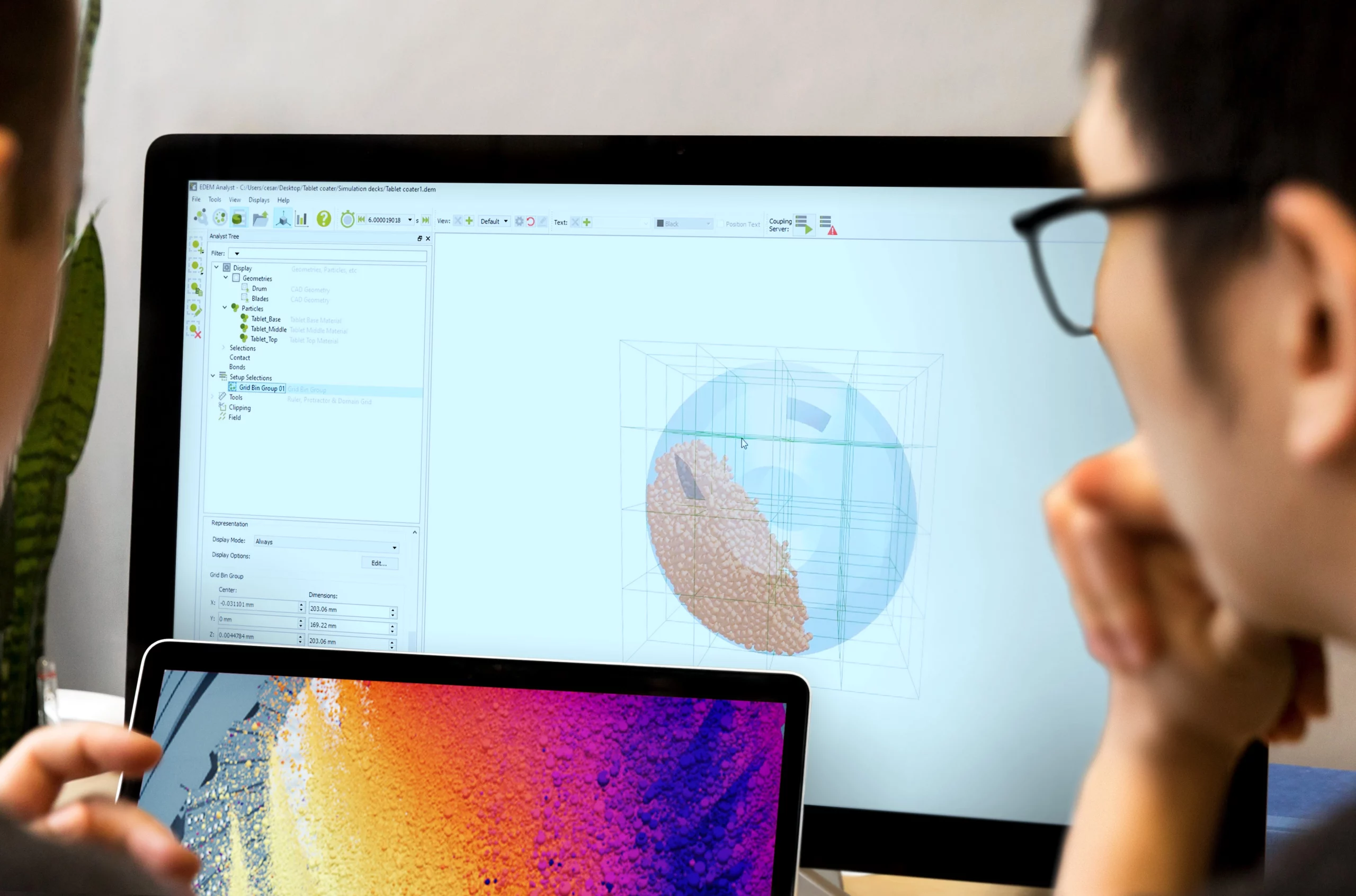
Simcenter EDEM (formerly Altair EDEM) is advanced Discrete Element Method software used to simulate and analyse the behaviour of bulk materials such as rocks, ores, soils, powders, tablets, grains, seeds, and other granular materials.
For engineering teams working with particle-based processes, bulk material interaction can be difficult to predict using physical testing alone. Material behaviour is affected by particle size, shape, density, cohesion, friction, flow properties, equipment movement, and operating conditions. Simcenter EDEM gives users a practical way to model these interactions digitally, helping them understand how materials move, settle, mix, compress, break, or interact with equipment.
Simcenter EDEM includes a wide range of tools that improve simulation setup, solver performance, material realism, post-processing, and integration with broader CAE workflows. These capabilities make it especially valuable for industries such as agriculture, construction and mining, pharmaceutical manufacturing, food processing, powder handling, and mineral processing.
Below are 10 important Simcenter EDEM features and capabilities that help users get more value from DEM simulation.
1. Material Model Libraries
Accurate DEM simulation starts with suitable material inputs. When modelling granular materials, users need to define parameters that represent how the real material behaves under practical operating conditions. For new users, or for teams working with unfamiliar materials, this process can be complex and time-consuming.
Simcenter EDEM includes material model resources that help users introduce virtual materials into their simulations more quickly and consistently. These resources provide practical starting points for different material types, reducing the amount of manual setup required before simulation work can begin.
1.1. Generic EDEM Material Model Database
The Generic EDEM Material Model, often referred to as the GEMM Database, provides access to a large collection of pre-calibrated material models. These models represent a wide variety of rocks and ores and are designed to help users create suitable DEM material inputs without starting from scratch.
Users can define key information about their real material, including the size of the application, the bulk density of the material, and the angle of repose. Based on these inputs, the GEMM Database provides a suitable EDEM material model that includes the physics and parameter values required to represent the behaviour of the material.
This helps make DEM simulation more accessible, especially for teams that need a reliable starting point for modelling rocks, ores, and other bulk materials.
1.2. Starter Packs for Soils and Powders
For more complex materials, Simcenter EDEM also supports starter material models that use advanced physics to represent behaviours such as compressibility, cohesion, stickiness, and flow resistance.
The Soils Starter Pack includes example soil models that represent different levels of compressibility and stickiness. These are useful for applications involving soil-tool interaction, off-road mobility, agriculture, excavation, earthmoving, and construction equipment.
The Powders Starter Pack provides example material models for fine powders with different flow properties and compressibility levels. This gives pharmaceutical, food processing, powder handling, and manufacturing teams a useful starting point for modelling materials that can behave in complex ways.
These material examples help users begin simulations faster while still allowing for further calibration and refinement when project-specific accuracy is required.
2. Bed Generation Tool
Many engineering applications require equipment or machinery to interact with large beds of material. This is common in agriculture, construction, mining, off-road vehicle development, and bulk handling applications.
In traditional DEM workflows, creating large material beds can take time because particles may need to be introduced into the simulation gradually through time-dependent inlets. Simcenter EDEM provides a more efficient approach through its bed generation tools.
The Bed Generation Tool, also known as Material Block functionality, allows users to create large beds of material quickly. Instead of waiting for material to be generated during the simulation, users can create smaller material blocks and use them to build larger beds more efficiently.
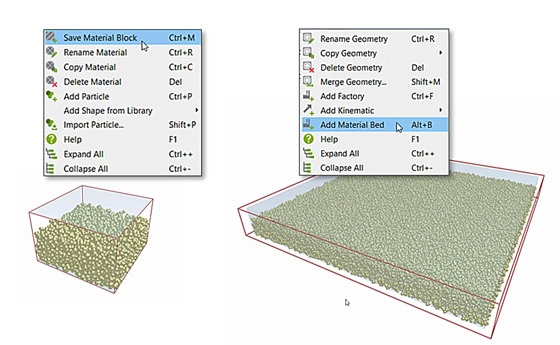
These blocks can be stored, reused, and shared between users or simulations. This helps reduce setup time and makes it easier to test multiple equipment designs against the same material conditions.
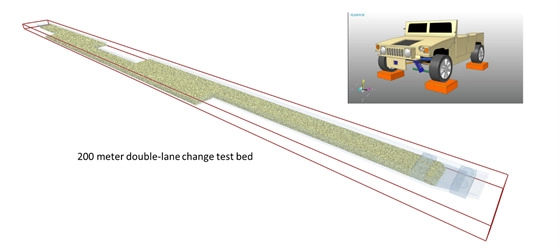
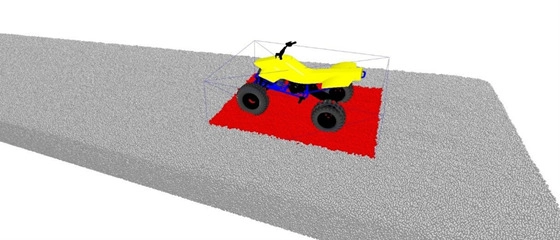
For example, a long off-road soil bed can be generated for vehicle or tyre-soil interaction studies. Agricultural equipment, mining machinery, and construction tools can also be tested against consistent material beds, making comparisons between designs more reliable.
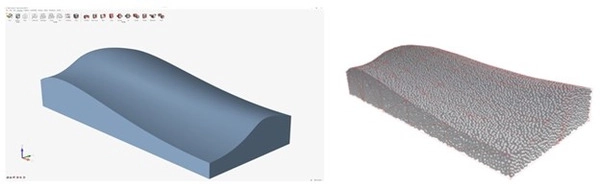
Simcenter EDEM also includes volume packing functionality, which allows users to generate tightly packed particle beds based on specific criteria such as porosity or compaction level. This can be applied to closed volume geometries, including arbitrary shapes and more uniform shapes such as cylindrical hoppers.
Once generated, these particle beds can be saved as material blocks and reused in future simulations. This makes bed generation faster, more consistent, and more practical for repeated simulation studies.
3. Dynamic Domain
Some applications require very large beds of material, especially when simulating off-road vehicles, agricultural machinery, or equipment moving over long distances. However, solving every particle interaction across an entire material bed can significantly increase simulation time.
The Dynamic Domain capability in Simcenter EDEM helps address this challenge by focusing simulation processing on the area where active interaction is taking place.
Rather than solving all particle contacts in the full material bed at all times, Dynamic Domain creates an active region around the moving equipment or relevant geometry. Processing power is concentrated on the material that is actively interacting with the equipment, while inactive regions do not add unnecessary computational cost.
This is especially useful for simulations involving long travel paths, such as a vehicle moving across soil or agricultural machinery operating across a material field. Users can create larger material environments while keeping simulation workloads more manageable.
Dynamic Domain helps users simulate larger, more realistic scenarios without increasing computational demand in the same way a fully active domain would. For projects involving large terrain beds, long interaction distances, or localised material disturbance, this capability can make DEM simulation more practical.

4. GPU and Multi-GPU Solvers
Large DEM simulations often involve very high particle counts. As simulations become larger and more detailed, solver performance becomes increasingly important.
Simcenter EDEM supports GPU and multi-GPU solving, allowing users to run simulations more efficiently than CPU-only workflows in suitable cases. This enables users to simulate larger systems and complete demanding particle simulations in a more manageable timeframe.
GPU acceleration is especially valuable for applications involving millions of particles, complex equipment interaction, bulk material transfer, powder flow, soil interaction, and high-volume handling processes.
Simcenter EDEM’s GPU solver is designed to support accurate DEM calculations while helping users improve simulation speed. Multi-GPU support also allows users with suitable hardware to scale performance further for larger studies.
Another important advantage is that GPU solving can be used alongside advanced simulation functionality, including API models and coupling workflows. This means users can still benefit from performance improvements even when working with more complex material behaviours or integrated CAE simulations.
For engineering teams, faster solver performance means more opportunity to test design alternatives, compare operating conditions, and refine equipment or process behaviour before physical testing.
5. Multi-Sphere and Polyhedral Particle Shape Solvers
Particle shape has a significant influence on material behaviour. Shape affects how particles roll, slide, interlock, settle, flow, mix, compact, and discharge. Because of this, DEM users need suitable particle representation for the material and application being studied.
Simcenter EDEM provides both multi-sphere and polyhedral particle shape options.
The multi-sphere approach is widely used because it offers a practical balance between simulation accuracy and computational efficiency. It allows users to represent non-spherical particles using groups of overlapping spheres, making it suitable for many common DEM applications.
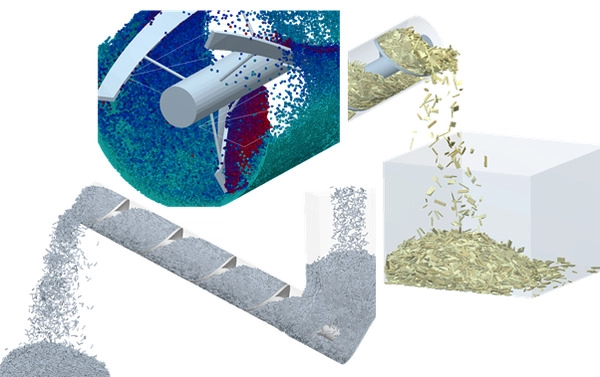
For cases where particle shape needs to be represented more precisely, Simcenter EDEM also provides a polyhedral particle solver. This is useful for materials with more defined shapes, such as cubes, cylinders, flat plates, angular particles, or high-aspect-ratio particles.
Polyhedral particles can be especially valuable when particle geometry strongly affects flow or contact behaviour. Examples may include flat materials moving through an auger, cubic particles in a mixing drum, or uniform particles discharging into a container.
By offering different particle shape approaches, Simcenter EDEM allows users to choose the most appropriate balance between detail, accuracy, and simulation performance.
6. Simcenter EDEM Application Programming Interface (API)
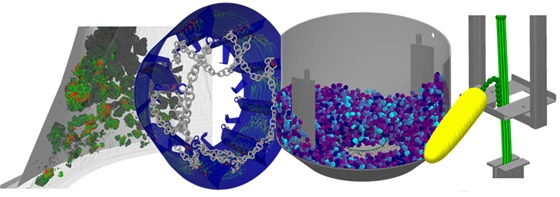
Some simulation projects require users to model material behaviours that go beyond standard physics models. This may include liquid effects, agglomeration, breakage, flexible fibres, magnetic particles, bonding, custom contact behaviour, or specialised industrial processes.
Simcenter EDEM includes an Application Programming Interface, or API, that enables users to write custom physics models for advanced material behaviour.
This gives experienced users and research teams the flexibility to extend Simcenter EDEM for highly specific applications. Instead of being limited to predefined models, users can create custom behaviour that better represents the material, process, or equipment interaction being studied.
The API is useful across many industries. In powder handling and pharmaceutical manufacturing, it can support complex cohesive or bonding behaviours. In mining and mineral processing, it can support breakage or fragmentation studies. In agriculture and food processing, it can help represent unique material interactions that are difficult to capture with basic assumptions.
API models can also be used with GPU solving, allowing users to benefit from improved performance while modelling more advanced material behaviour.
This makes the Simcenter EDEM API an important capability for teams that need simulation flexibility beyond standard DEM modelling.
7. Tavares Breakage Model in Simcenter EDEM
Breakage is a key area of interest for many users, especially in mining, mineral processing, aggregates, and comminution applications. Materials can break due to impact, compression, shear, weakening, or repeated loading, and these effects can influence equipment performance and process outcomes.
Simcenter EDEM includes breakage modelling capabilities that allow users to simulate the fragmentation and weakening of brittle materials.
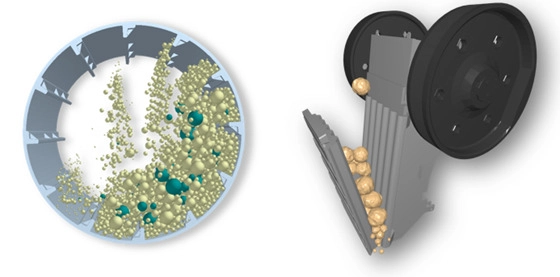
The Tavares Breakage Model in Simcenter EDEM is based on research in comminution and particle mechanics. It helps users study how brittle particles may break under different loading conditions, supporting applications such as crushers, mills, and other equipment where particle size reduction is important.
Breakage simulation can provide insight into how material behaves inside processing equipment. It can help users evaluate equipment design, understand particle fragmentation, investigate process performance, and assess how changes in operating conditions may affect material output.
This capability is particularly relevant for applications involving SAG mills, jaw crushers, and other systems where particle breakage directly affects product size, throughput, wear, and equipment behaviour.
By including breakage modelling within the DEM environment, Simcenter EDEM gives users a practical way to study how particles transform under real operating forces.
8. EDEMpy for Post-Processing Simulation Data
Large DEM simulations can generate significant amounts of data. Once a simulation has been completed, users often need to extract specific information, compare results, and process simulation outputs in a meaningful way.
EDEMpy is a Python library for post-processing and analysing Simcenter EDEM simulation data. It works with EDEM simulation data files and allows users to extract, process, and reuse simulation results through custom workflows.
With EDEMpy, users can extract forces acting on selected geometries over time, compare results between multiple simulation decks, track particle residence time, visualise contact and bond networks, analyse material behaviour as a continuum, and calculate post-processing properties such as segregation index or tortuosity.
This is valuable for users who need more than a visual review of particle motion. It helps engineering teams turn simulation data into measurable results that can support design decisions, process comparisons, and performance evaluations.
EDEMpy also supports repeatability. Once a post-processing script has been created, it can be applied to similar simulations, helping users analyse large datasets more consistently.
For teams running multiple simulation studies, EDEMpy can make result extraction and comparison more efficient.

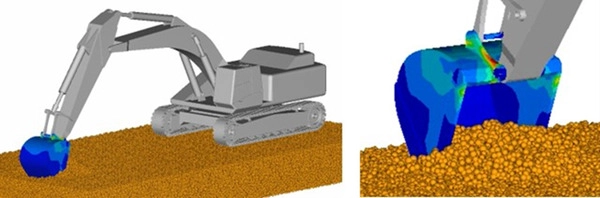
9. Deformable Geometries
In many real-world applications, equipment and material do not interact as perfectly rigid systems. Components such as belts, panels, liners, membranes, flexible bodies, and moving machine parts may deform under particle loading.
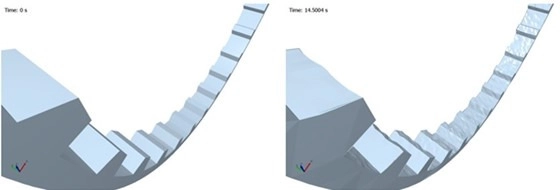
Simcenter EDEM supports workflows that allow geometry deformation to be considered during simulation. The solver engine can support changes to geometry structure during a simulation, with deformation input provided through coupling interfaces.
This enables users to connect Simcenter EDEM with flexible body simulations and study how particles interact with deformable equipment. Applications can include conveyor belts, flexible panels, mill liners, sheet materials, elastic membranes, and machine components that respond to material loading.
A flexible geometry coupling workflow can also allow users to predict deformation and stress within individual parts. This provides a more realistic understanding of how bulk material loads affect equipment performance and durability.
This capability is useful when users need to understand both the behaviour of the material and the response of the equipment. Instead of treating particles and structures separately, coupled simulation can show how the two influence each other.
For applications where material loading, stress, deformation, or equipment flexibility is important, deformable geometry support adds valuable realism to the simulation workflow.
10. Extensive CAE Integration
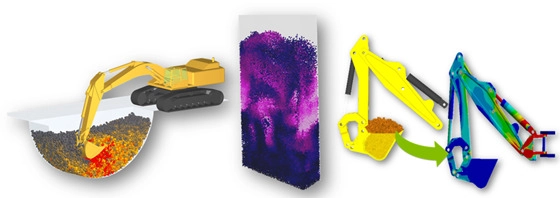
Engineering teams often use several CAE tools during product development and process optimisation. For this reason, DEM simulation becomes more powerful when it can work alongside other simulation technologies.
Simcenter EDEM is designed to integrate with broader CAE workflows, including structural analysis, multi-body dynamics, and computational fluid dynamics. These integrations allow users to study bulk material behaviour as part of a wider engineering system.
For example, EDEM can be coupled with tools used for motion simulation to study equipment interaction with particles. It can be combined with structural simulation to evaluate material loading on components. It can also support fluid and particle interaction studies where material behaviour is influenced by surrounding air or liquid flow.
The EDEM Coupling Interface also allows users to create custom couplings with other tools when needed. This flexibility is useful for teams that have established simulation workflows and need DEM to form part of a larger analysis process.
CAE integration helps users move beyond isolated particle simulation. It allows them to study how materials interact with moving equipment, structural components, fluid systems, and complete machine behaviour.
This makes Simcenter EDEM valuable not only as a standalone DEM tool, but also as part of a connected engineering simulation workflow.
Bringing the Capabilities Together
The value of Simcenter EDEM becomes especially clear when multiple capabilities are used in the same simulation workflow.
For example, an off-road vehicle simulation may begin with a soil-like material selected from a material model database. A long material bed can then be generated using bed generation tools. The vehicle and tyres can be coupled with a multi-body dynamics simulation to represent realistic movement and equipment interaction. The simulation can then be accelerated using GPU solving, while Dynamic Domain focuses processing power around the active tyre-soil contact region.
This type of combined workflow allows users to simulate large, realistic applications in a more efficient way. Instead of relying on one isolated feature, engineers can combine material models, particle beds, solver acceleration, dynamic processing, and CAE coupling to create a more complete representation of real-world behaviour.
For industries working with soil, rocks, ores, powders, grains, tablets, pellets, or other bulk materials, these capabilities help teams understand how materials behave before committing to physical testing, prototype changes, or production adjustments.
Find the Right Simutron Solution
Simutron supports simulation-driven engineering workflows across a range of industries and analysis areas. Explore the most relevant solution page below:
Speak to Simutron About Simcenter EDEM
If your team works with powders, grains, ores, rocks, soil, tablets, pellets, or other bulk materials, Simutron can help you identify the right simulation workflow for your application.
Next step: Contact Simutron to discuss your application or request guidance on the most suitable Simcenter EDEM solution for your industry.
This content is adapted from the original Siemens Community article.